Mostrar mensagens com a etiqueta ios. Mostrar todas as mensagens

terça-feira, 8 de julho de 2014

Google Chromecast - IOS


After testing the Chromecast (CC) with my iphone the truth is that if you only have IOS devices the Chromecast isn't for you.
Even if you Iphone is jailbroken you can't use the full potencial of the CC.

There some apps that are compatible with the CCon the App Store , the one that works really well is the You Tube app , that works flawlessly.

If you are looking to stream local stored videos on your iphone or ipad the best app for that is the Real Player Cloud , it can even play media from the cloud and best of all its free.

Since the main purpose for buying the Chromecast was to watch movies and tv shows , i'm sorry to said that (until now) there's no way to stream XBMC from you IOS device to the Chromecast.

The solution i found was to use Movie Box and Real Player Cloud together.
Movie Box is and app  (only available through cydia) that allows you to stream and download movies and tv shows directly from the web and if you are running some XBMC distro, you can stream Movie Box using Air Play.


The app is not compatible with the CC, so the workaround i found was to download the media using Movie Box and using Ifile to move it to the Real Player app Folder, it's not really a stream but at least you can view the downloaded media (you probably can you iFunBox for this to).


Here are the source and destination for this to work.

Movie Box download folder /var/mobile/Library/Artworks

RealPlayer media folder /var/mobile/Applications/"you need to find the folder"/Documents


After that the media file you downloaded from Movie Box should be available on Real Player and now you can stream it to your TV using Chromecast.


  • List of IOS apps with support for ChromeCast

sexta-feira, 27 de junho de 2014

Google Chromecast - Start

Finally my Google Chromecast has arrived!

What is a Chromecast?
A Chromecast it's a device that you connect to your TV (or any device with a HDMI in) and it allows you to stream content from your smartphone.

So why did i bought a Chromecast?
I already have a Raspberry Pi with XBMC that i use it for every multimedia purpose, such has playing movies and tv shows from my local server, streaming content from the web (movies,tv shows, sport events) and even using it for airplay on my IOS devices.
The problem is that i have 3 TVs and 1 Video Projector around the house and only one TV is really "Smart". Walking around the house with the Raspberry Pi, the USB cable, the USB charger, the HDMI cable and the Ethernet cable is not very convenient.
So the Chromecast was the perfect solution.


First impressions.

Nice small box with everything in it, Chromecast, USB Cable , USB Charger (5v 2A) and Google also included a HDMI extention, so if you only have a HDMI back port you can still put the TV against the wall without the ChromeCast getting in the way.


Setting it UP.

It was really easy to set up, just connect it to you TV and connect the USB cable to the USB charger and turn you TV on.(You can connect the USB cable to an available port on your TV, it should work if the USB port on your TV has enough Amps(around 750mha) for the CC, in my case it worked in every TV)

Just download the Chromecast app from Google Play or the App Store if you have an Android or IOS device if you are on your computer just use your Chrome browser and access http://www.google.com/chromecast/setup. (Sorry i don't have any Windows Mobile Phone)

Now follow the steps adding the Chromecast to your network, changing its name and your ready to Go!


Next:
Using it with Android Devices (Nexus 7)
Using it with IOS Devices (Iphone5 Ipad Mini Retina JB)
Using it with Chorme Browser


quarta-feira, 17 de abril de 2013

My IPhone Cydia Programs


IStreamNet


This Software allows you to steam and download your favorite TVShows directly from your Iphone.


ProTube

With this software you can download youtube videos and audio.


snes4Iphone

If you love the old SNES classic this is the emulator for you. (Support WiiMote)

IFile

With IFile you can access your IDevice FileSystem.

iBlackList

Do you need to block someones calls and messages? This is the tool for you


MobileTerminal

Need to SSH to a remote machine and don't know how?
Just do it from your IDevice with this terminal.


APPCAKE

With this app you can download APPSTORE Apps


REPO : http://cydia.iphonecake.com

vShare


With this app you can download APPSTORE Apps


REPO: http://repo.appvv.com

--------

add this repo to cydia www.sunfuliphonerepo.com

sábado, 6 de abril de 2013

My IPhone Cydia Tweaks

If you got a Jailbreak Iphone there are a lot of tweaks ready to make your life easier.
These are my Cydia Tweaks.

PasswordPilot

PasswordPilot allows you to save your Itunes password so you don't have to type it every time you're trying to download something from the Appstore.


Zephyr

Zephyr is a tool that saves your Home Button, it allows you to access your running apps just by swiping your finger from the button , and switching apps just by swiping left or right.
It does much more but this are the main features i use.


Zeppelin

There are tools that allow you to change the carrier name on your idevice bar, Zeppelin can change it to an icon of your choice.


WinterBoard

The tool that allows you to customize your iphone looks it supports lots of the with different colors and icons.


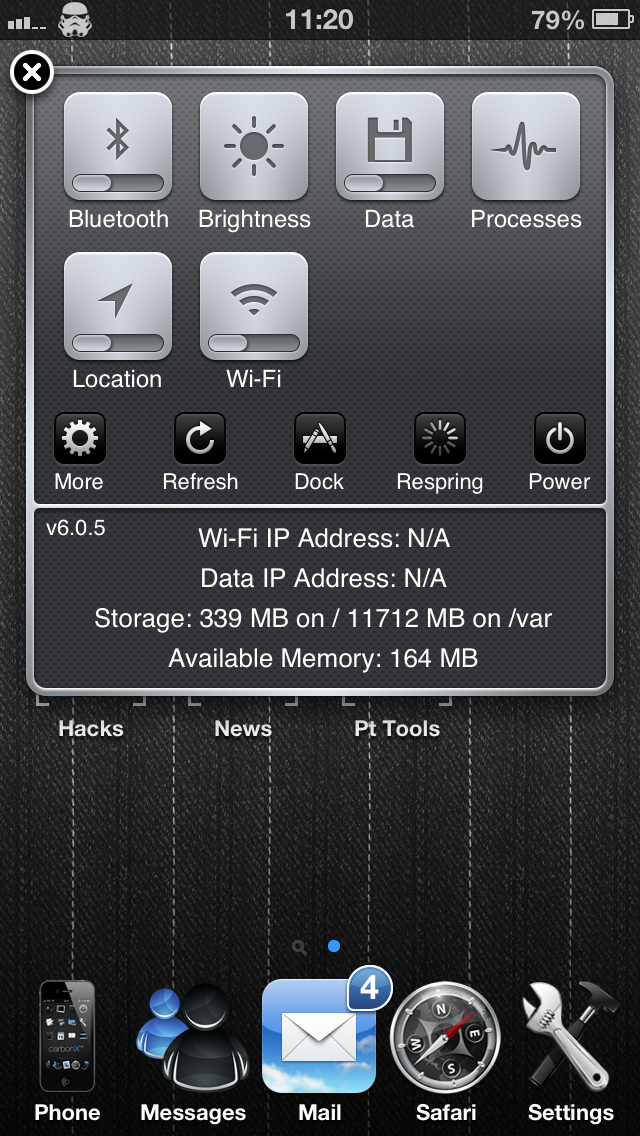
SBSettings

Probably the first tweak i used since my iphone 3G, and covers the biggest IOS flaw, the fast access to different settings.
-Wifi
-3G
-Data
-Bluetooth
-GPS
-Brightness
-...


Auxo

Its a great great tool it allows fast closing apps (just by swipping down), allows multi closing, access to the same toggles as SBsettings, access to media controls, Thumbnails for the runnings apps and much more.


Activator

This tools is very useful if your Home Button is already dead, you can bind any key or action to different keys and actions.


Five Icon Dock

5 Icons on your dock

openSSH

Allow SSH communication on your device.

Five-Column Springboard

Useful it you like to have it all in one screen.

DietBar

Verify useful if your don't have a large screen like a Iphone 5, it gives you more screen area, its great for web browsing.